
What designers wish you knew about “vectors”, the file type that can be printed as big as an ocean.
If you’ve ever worked with a print house, design firm, or creative agency, you’ve probably heard it before: “we need that in a vector format”.
The person making the request, often a designer, might mention various types of “vector” files: EPS, PDF, AI. Then they may ramble on about how great vector files are, or share a poem they wrote about this incomparable file format…
“Oh, that’s not so bad!” you say to yourself, “My app can make a PDF.”
So you open your file in Word and export the file to a PDF — easy! You attach the file to your email and send it off, waiting for the inevitable “thank you.”
But the email you get back is much too long. The designer says she can’t use the PDF and, on top of that, it’s not a vector file. Or it doesn’t have vector contents. Or something like that.
So you try an EPS (if you’re lucky enough to have software that can export it), but she replies the same way and adds “we can vectorize the logo for you, but it will cost x dollars.”
Now you know you’re being scammed. Right?
A file by any other name…
In graphic design software, there are various kinds of objects and data we work with. They could be fonts, bitmaps, vectors, effects, etc. The part that’s confusing is that a vector file format (like PDF, EPS, or AI) may contain both vector and/or bitmap contents.
The file is sort of like wrapping paper. You can wrap two different boxes with the same paper — and they can look exactly the same on the outside — but the contents may be entirely different.
So when a designer says your PDF or EPS is still not a vector file (even though she just told you a PDF is a vector format) what that means is that the file contains bitmap objects, not vector.
But I still haven’t explained the difference…
A bitmap is comprised of hundreds or millions of pixels (little squares, as I’m sure you know), and each of those pixels is a different colour. Sometimes a pixel also contains transparency information. When you stand far enough away from a bitmap, those pixels blend together and create an image. Maybe a photo of a cat or — and this is where it gets complicated — maybe an image of text or a logo.
The problem is that a bitmap has a fixed resolution. If it’s 500 x 100 pixels, when you scale it up too much, you’ll just see 50,000 little boxes.
A vector object, on the other hand, contains nodes and handles along with direction and speed data. Think of a node as a destination point on a map. The handle sticks out from a node, giving both the direction and the speed of the path to the next destination. A vector file effectively describes where the nodes are in relation to one another and how to get from point A to point B to point C.
For you math geeks, it’s the difference between a matrix (bitmap) and a graphed function, like a parabola in a cartesian coordinate system (vector).
Why is that important? The advantage of a vector object is that it is resolution independent. If you scale it up, the design software just reinterprets the path and translates where the nodes are in relation to one another. The path itself still remains infinitely smooth.
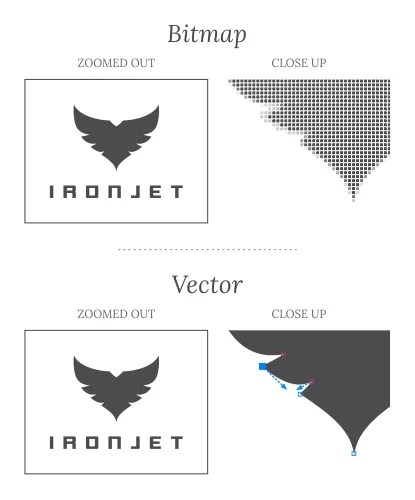
In simple terms, that means the object can be scaled up (or down) to any size without affecting its quality. It could indeed be scaled up to the size of an ocean, if there were a machine that could produce such a large print.
It also means that certain types of machines (such as a vinyl cutter) can use the vector information to tell the blade what path it needs to take to cut out a decal, or what path a CNC Router will take to cut a piece of aluminum into a custom shape.
What’s our vector, Victor?
At some point during the email correspondence, the designer probably offers to vectorize the logo for you.
Vectorize is just a fancy way of saying, “I’m going to trace the logo.”
There are many apps out there that promise to automatically vectorize any logo, and some of them do a decent job, but only to a point. They don’t work well when the supplied bitmap is too low resolution — the app just starts to see a bunch of boxes and trace them as such. You’ll also notice that an app’s automatic trace function often has trouble with images of text.
A designer may run the bitmap through an app or plug-in first, and then make adjustments afterward, or she may just vectorize the bitmap from scratch, manually. The latter approach almost always produces superior results to an auto-trace… at least, as good as the designer is. Hopefully you’re connected with an experienced designer, and he or she is able to create a pristine vector file.
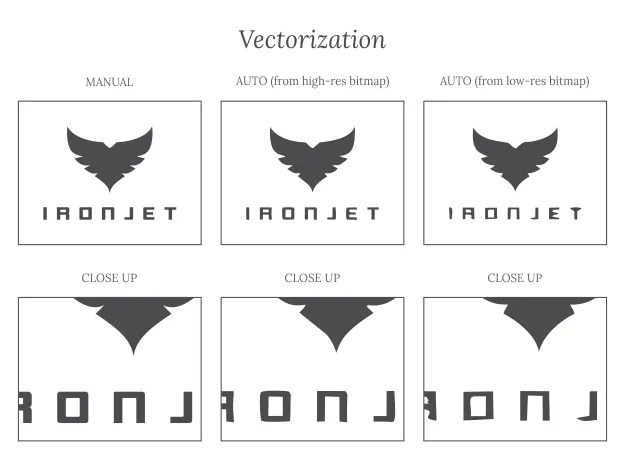
In the above image you’ll notice that, from afar, there isn’t really a whole lot of difference between the end results. There are occasions when you don’t need a perfect result and an auto-trace will do, but usually these are limited to very small applications. Even so, some small applications (like shaped stickers) still need a vector file so the machine can read the data. As soon as you need something big enough to go on a t-shirt (or a vehicle wrap), you’re going to notice those imperfections.
And if you don’t, the machinery will. A vinyl cutter might just get angry enough to chew up part of the roll if the vector file isn’t well done.
Trust me, I’m a professional
In a world where it’s easy to be suspicious of any professional—whether it’s a dentist telling you a root canal is a better option than pulling the tooth, or a mechanic saying he needs to replace your air filter—a good graphic designer really just wants you to look your best. Remember, these are often people who don’t make the big bucks, but aspire to make the world more beautiful… not quite starving, maybe, but artists through and through.
So believe your designer when she tells you that your logo needs to be vectorized. It could be the difference between your logo looking like Michaelangelo’s “David” or a just another lump of rock.

About the Author
Graeme J. Friesen is a graphic designer, illustrator, brand consultant, and CorelDRAW Featured Artist with 24+ years professional design experience, Graeme has a BA in Strategic Ministries.